


User experience (UX) design for B2B companies differs significantly from B2C due to the complexity of business relationships, decision-making processes, and product integrations involved. UX design is an often overlooked area in B2B product development, but the impact of design choices can be just as significant as in the consumer space.
Table of Contents
- Key Differences Between Designing B2B and B2C Products
- Key Takeaways
- How B2B Expectations Have Grown
- Standout B2B UX Examples
- Unique B2B Design Considerations
- How the B2B UX Design Process Works Differently from B2C
- Understanding Complex Buyer Journeys
- Designing for Multiple Stakeholders
- Prioritizing Content and Information Architecture
- Mapping Organizational Workflows
- Facilitating Cross-Functional Collaboration
- Navigating Organizational Politics
- Conclusion
- FAQ
UI and UX expectations differ significantly between B2B and B2C contexts due to the distinct nature of users, goals, and environments involved.
B2B users are professionals operating complex systems and workflows within an organizational setting. They prioritize efficiency, productivity, and depth of functionality over aesthetics. The UX needs to cater to expert users, support intricate processes, integrate with existing systems, and facilitate collaboration across teams.
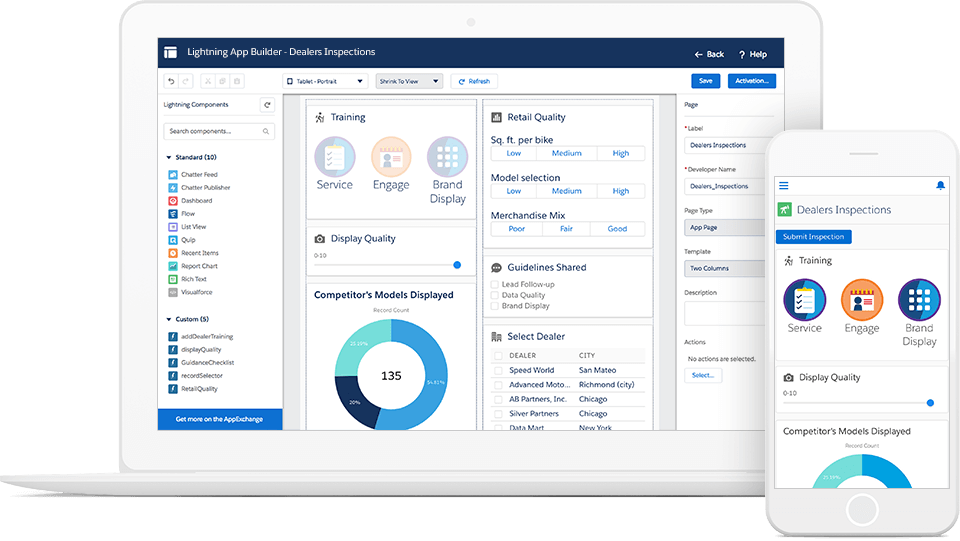
In contrast, B2C experiences target individual consumers focused on simplicity, convenience, and emotional appeal. Visual design and branding play a bigger role in driving engagement and conversions.
Information architecture is paramount in B2B, with emphasis on structuring dense, domain-specific content to aid findability and decision-making. B2C UX leans more towards clean, intuitive navigation supporting straightforward purchase flows.
Customization and personalization are critical B2B requirements to accommodate diverse roles, preferences, and integration needs across the organization. B2C personalization is geared towards tailoring marketing and product recommendations.
While responsive design is table stakes for both, B2B mobile experiences may need to facilitate field operations and remote collaboration. B2C mobile prioritizes streamlined shopping and content consumption.
Overall, B2B UX caters to professional power users operating in complex environments, demanding depth, efficiency, and integration — a stark contrast to the simplicity and emotional appeal driving B2C experiences.
| Key Takeaway | Description |
|---|---|
| Prioritize Depth and Efficiency | B2B UX must cater to professional power users operating in complex environments, prioritizing depth of functionality, efficiency, and integration over aesthetics. |
| Balance Functionality and Experience | While core usability remains paramount, B2B users now expect the same level of thoughtful design, visual appeal, and seamless cross-platform access found in consumer products. |
| Optimize Complex Workflows | Interaction design should focus on streamlining intricate workflows, automating manual steps, and facilitating cross-functional collaboration. |
| Structure Dense Information | Information architecture is crucial for structuring dense, domain-specific content to aid findability, discoverability, and decision support. |
| Enable Extensive Customization | Customization and personalization capabilities are critical to accommodate diverse roles, preferences, and integration needs across the organization. |
| Foster Cross-Functional Collaboration | Iterative design approaches and cross-functional collaboration are essential throughout the product lifecycle to balance competing priorities and ensure successful adoption. |
| Address Unique B2B Considerations | Unique aspects like enterprise integration, regulatory compliance, advanced analytics, scalability, and complex approval workflows must be addressed. |
| Understand Organizational Dynamics | Navigating convoluted buyer journeys, managing multiple stakeholders, organizational politics, and change management are critical for B2B UX success. |
While B2B users prioritize functionality, efficiency, and integration over aesthetics, they have come to expect certain aspects traditionally associated with B2C UX design:
While core usability, depth, and integration remain paramount, B2B users have raised the bar for overall experience quality. They expect the same level of thoughtful design, visual appeal, and seamless cross-platform access found in consumer products.
Get User Feedback for Your B2B Product
Understanding your users’ needs is the foundation of effective B2B UX design. clickworker gives you access to over 10 million pre-screened survey participants worldwide — targetable by industry, role, and usage behavior. Collect actionable UX insights fast.
Find Survey Participants for UX Research
Here are some examples of exceptional B2B UX design that illustrate how different teams have tackled the unique challenges of professional software.
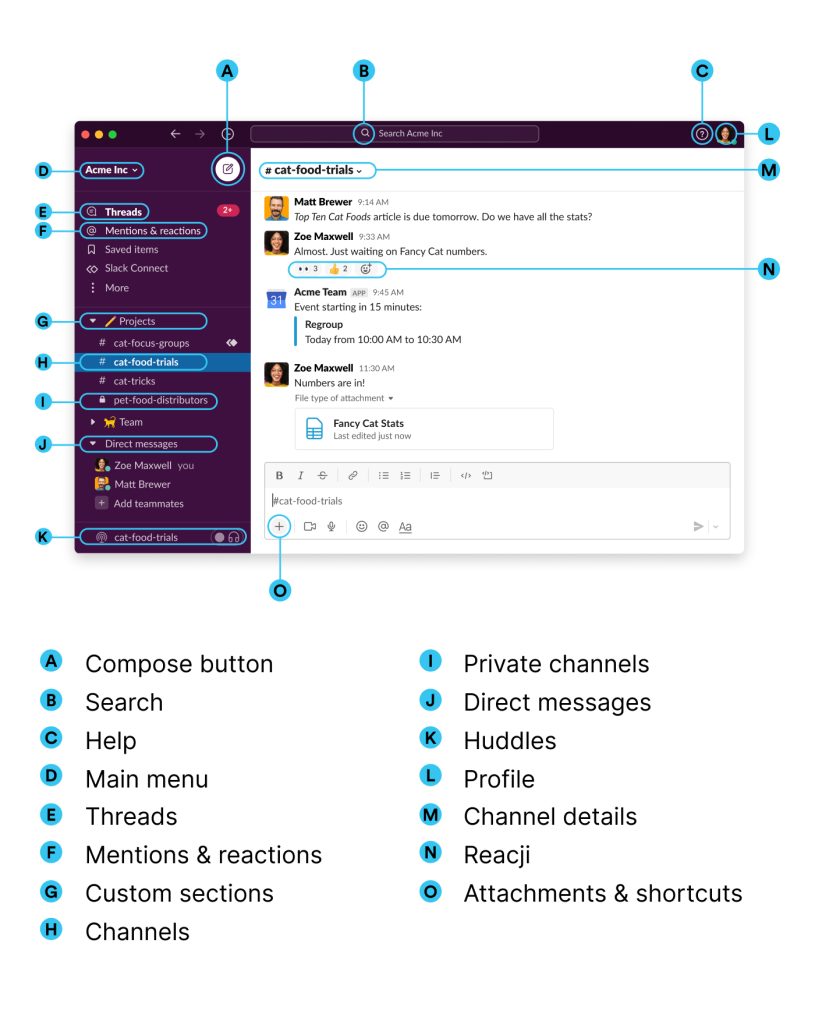
Slack is renowned for its user-friendly interface that facilitates seamless team communication and collaboration. Its clean design, intuitive navigation, and real-time messaging make it a standout in the B2B space.
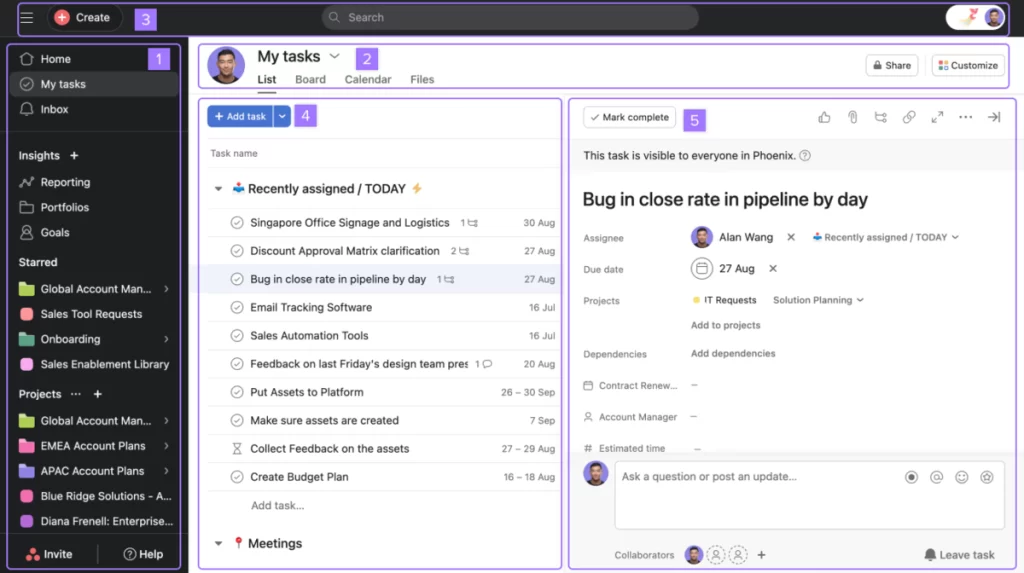
Asana offers a well-designed project management solution with a visually appealing interface that simplifies task tracking and team coordination. Its use of gamification elements like the celebratory unicorn adds delightful moments to the user experience. It was one of the first large B2B products to add support for dark mode.
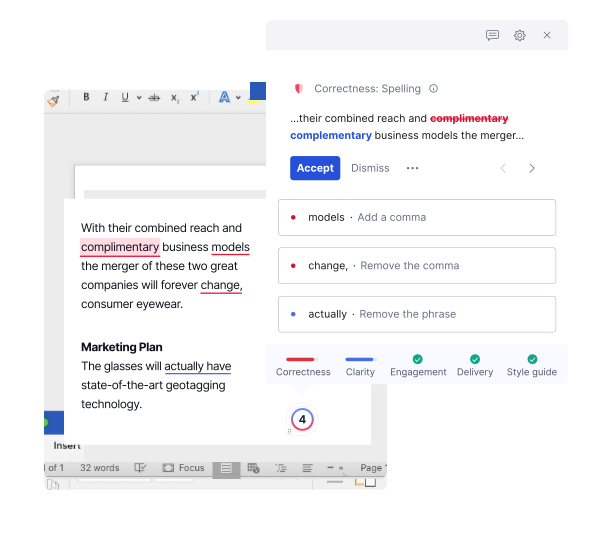
Grammarly’s writing assistant seamlessly integrates into various platforms, providing real-time suggestions and feedback with a minimalist UI that doesn’t disrupt the user’s workflow. Its demo document feature offers a hands-on product experience.
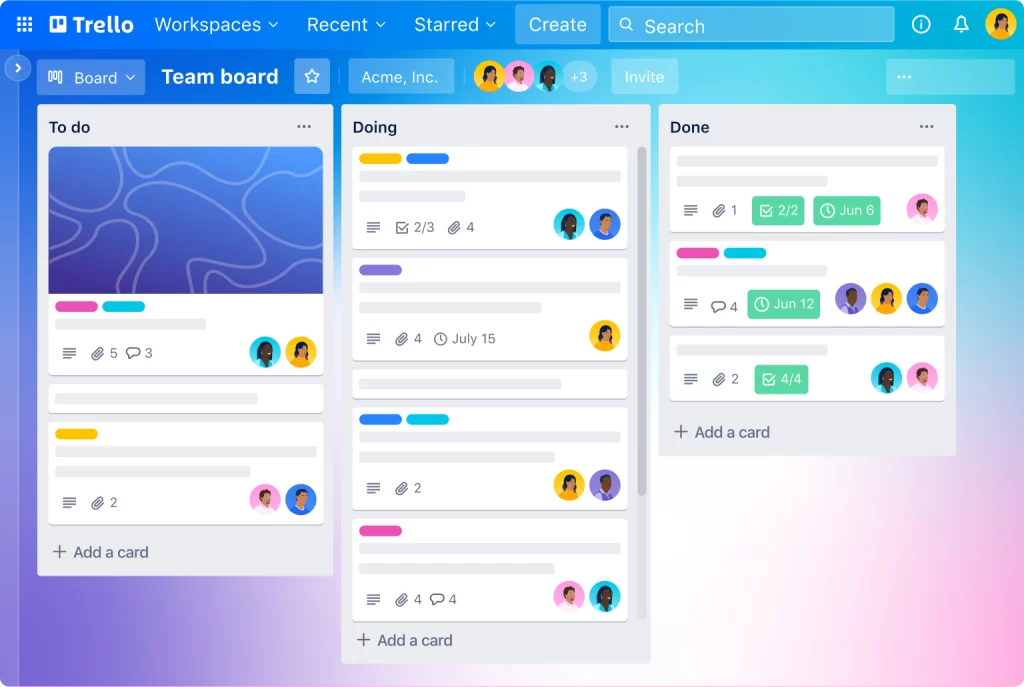
Trello employs a creative approach with its kanban-style boards, draggable cards, and visual cues like placeholder text that guide users through key actions intuitively. Its mobile accessibility is also noteworthy.
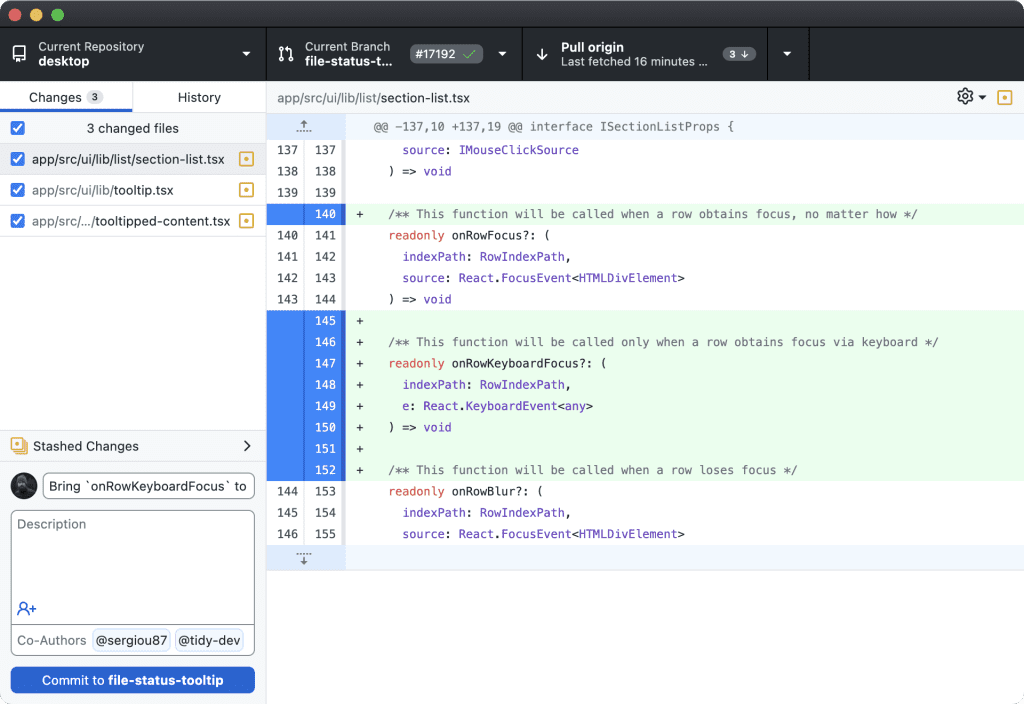
GitHub’s code repository interface strikes a balance between depth of functionality and ease of use, enabling developers to manage complex projects while maintaining a clean, uncluttered experience.
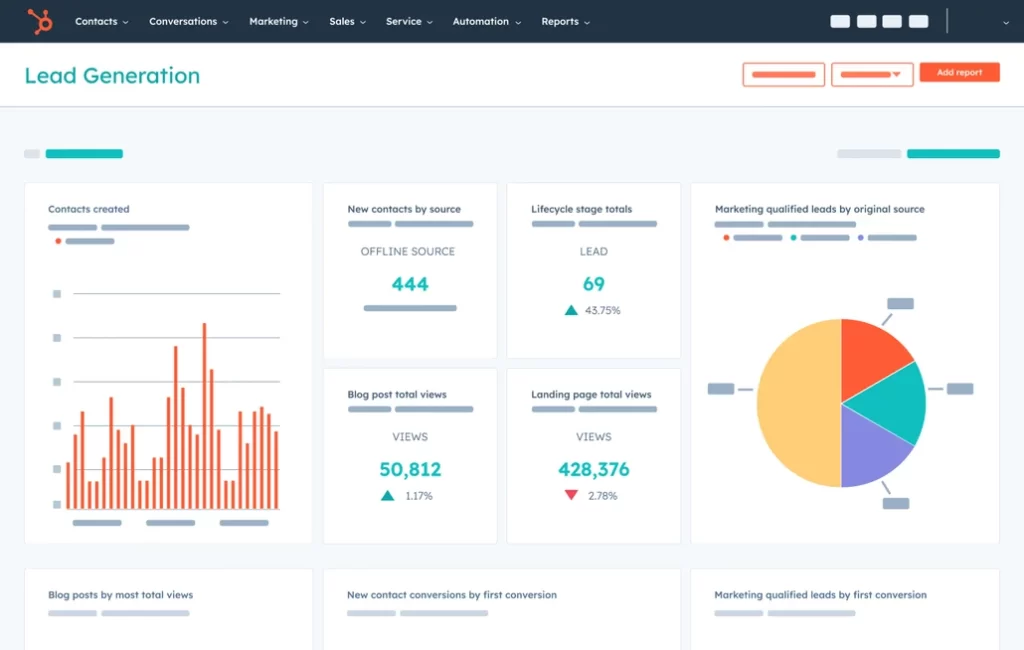
HubSpot’s CRM dashboard exemplifies effective data visualization, presenting key metrics and insights through clear graphs and charts within a well-organized layout.
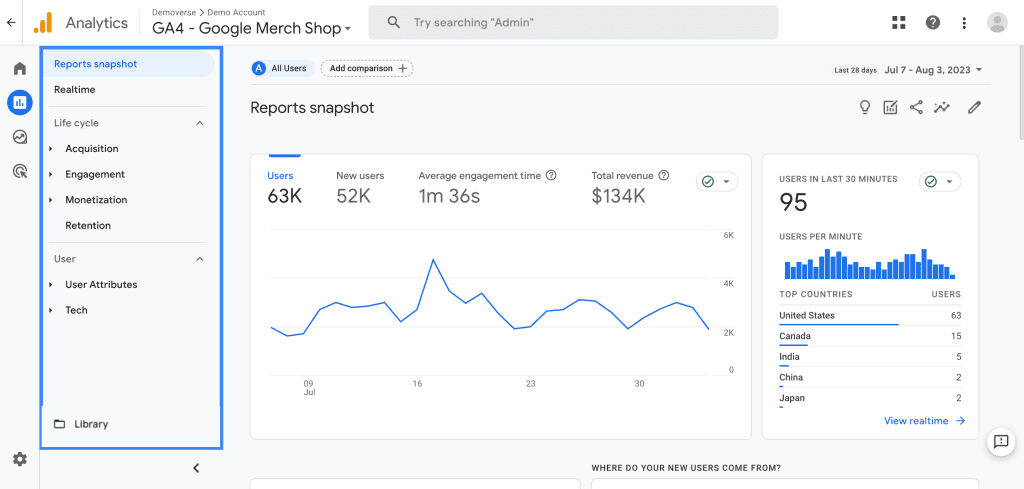
Google Analytics’ mobile-friendly design allows users to access comprehensive website data and generate insightful reports from anywhere, with a straightforward UI tailored for on-the-go analysis.
These examples showcase how B2B UX design can prioritize usability, efficiency, and depth while incorporating modern UI elements, visual appeal, and delightful moments to create exceptional user experiences.
There are several aspects of B2B UX and UI design that are unique and don’t exist in the B2C context. Each stems from the complexities of enterprise environments, regulatory requirements, and the need for robust, scalable solutions tailored to professional users.
The UX design process for B2B products differs significantly from B2C in several key aspects. Understanding these differences is essential for teams that want to build products that genuinely serve professional users — not just pass a usability test.
Overall, the B2B UX design process emphasizes a deep understanding of professional contexts, optimizing complex workflows, structuring dense information, enabling customization, and fostering cross-functional collaboration — a clear contrast to the consumer-centric approach of B2C UX design.
The modern B2B buying journey is highly complex, involving multiple stakeholders, extended timelines, and non-linear paths. Buyers engage in various activities like problem identification, solution exploration, requirement building, supplier selection, validation, and consensus gathering — often revisiting these stages simultaneously rather than sequentially.
This complexity stems from factors like higher costs, business-critical risks, and the need for thorough evaluation to minimize wrong decisions. Mapping this intricate journey is therefore crucial for businesses to align their strategies, provide relevant information at the right touchpoints, and build lasting relationships that drive conversions and loyalty.
When designing systems or products that involve multiple stakeholders, it is crucial to identify and engage with all relevant parties from the outset. This includes understanding their diverse needs, priorities, and constraints to create solutions that balance potentially conflicting requirements.
A key step is defining the system scope and boundaries while analyzing and prioritizing stakeholder requirements, both functional and non-functional. Iterative approaches like Design Thinking can facilitate alignment through stages like empathizing, defining, ideating, prototyping, and testing. Techniques like Stakeholder Personas help structure knowledge about each party’s motivations, roles, and decision-making processes.
Effective communication and collaboration strategies are vital throughout the design lifecycle, as is continuously evaluating, testing, and managing changes and risks — to ensure the system delivers maximum value for all involved.
When prioritizing content and structuring information architecture, the primary focus should be on meeting user needs and supporting their goals. This involves several interconnected steps:
The goal is an information architecture that transparently connects users to the content they need while guiding them towards intended conversion paths.
Organizational workflow mapping involves creating visual representations of the processes, tasks, and information flows within an organization. This practice is crucial for understanding how work gets done, identifying inefficiencies, and optimizing operations.
The mapping process typically involves:
Workflow maps offer several benefits:
Mapping organizational workflows promotes transparency, cross-functional collaboration, and continuous process optimization — key drivers of operational excellence.
Facilitating effective cross-functional collaboration requires a structured approach to align diverse teams and skillsets towards shared goals. Key practices include establishing a clear project charter that defines the purpose, scope, roles, and success metrics agreed upon by all stakeholders, as well as co-creating team norms around communication channels, decision-making processes, and feedback mechanisms.
Productive meetings with prepared agendas, engagement techniques, and documented outcomes keep teams accountable. Monitoring team performance through data and regular check-ins helps identify risks and address conflicts before they escalate. A final debrief after each initiative captures lessons learned and improves facilitation for future cross-functional projects.
When managing competing priorities, several practices consistently make a difference:
Navigating organizational politics is a critical skill for success in B2B environments. Here are some strategies to effectively handle competing interests and stakeholder dynamics:
Designing exceptional user experiences for B2B products requires a fundamentally different approach compared to B2C. B2B UX must cater to professional users operating in complex organizational environments, prioritizing depth, efficiency, integration, and support for intricate workflows. At the same time, the bar for overall experience quality has risen: B2B users now expect the same level of thoughtful design and seamless cross-platform access found in consumer products.
The B2B UX design process itself reflects these demands, emphasizing deep research into professional contexts, optimization of complex workflows, structured information hierarchies, extensive customization, and continuous cross-functional collaboration. Unique considerations like enterprise integration, regulatory compliance, advanced analytics, and scalability add further complexity that B2C designers rarely encounter.
Ultimately, delivering exceptional B2B user experiences requires a holistic approach that harmonizes depth of functionality with modern design sensibilities — while addressing the intricate dynamics of professional environments.
The key insights at a glance:
Recruit B2B Users for UX Research
Getting feedback from the right professional audience is what separates good B2B UX from guesswork. clickworker provides access to over 10 million pre-screened participants, targetable by job role, industry, company size, and more. Run surveys or usability studies with exactly the decision-makers and power users your product is built for.
Find B2B Survey Participants
The primary differences lie in the relationship with customers and how insights are gathered. B2C projects focus on analytics, personas, and interviews with selected individuals, whereas B2B projects involve a more personalized approach, often with a smaller number of customers, and require maintaining strong relationships to meet their specific needs.
B2B products are often highly specific to an industry and require a deeper understanding of its nuances. This complexity creates a need for customizations and shortcuts to improve efficiency, which must be balanced with the need for a visually appealing and consistent design.
User research is crucial in B2B UX design as it helps designers understand the specific needs and pain points of business users. This research informs design decisions and ensures that solutions meet the requirements of the target audience — often requiring a more personalized approach due to the smaller number of customers involved.
B2B UX design improves customer satisfaction by prioritizing functionality and efficiency, providing shortcuts and customizations, and tailoring the design to the specific needs of the project. Maintaining strong relationships with customers and deeply understanding their workflows is equally essential.
The success of B2B UX design is typically measured using metrics such as user retention, time-to-value, customer satisfaction, and return on investment (ROI). These metrics help quantify the impact of UX design choices on business outcomes.


