


Usability testing is a critical component in the design process, a beacon that guides developers and designers to create products that are not just functional but also user-friendly. Imagine you’re crafting a survey platform; you’d want it to be as intuitive as a friendly conversation, right? That’s where usability testing comes into play. Now, let’s break it down in a way that’s as easy to grasp as clickworker’s user-friendly survey tool:
Table of Contents
- What is Usability Testing?
- Why is Usability Testing Important?
- The Difference Between Usability Testing and User Testing
- Usability Testing Methods
- How Does Usability Testing Work in General?
- Usability Testing through Online Surveys
- Guide: Usability Testing with clickworker’s Survey Tool
- Conclusion: Use Usability Testing to Unlock Optimization Potential
Usability testing is like a rehearsal before the big show. It’s when real users interact with your product while observers (think of them as directors) watch and note what works and what needs a tweak. The goal? To ensure that your product doesn’t just work, but works well for your audience.
Imagine you’re exploring a new city without a map. Frustrating, isn’t it? Usability testing ensures your users don’t feel that way about your product. It’s about making sure that the journey through your app or website is a stroll in the park, not a trek through the wilderness.
Understanding the distinction between Usability Testing and User Testing is vital for product development. Though they sound similar, their focus and outcomes significantly differ.
| Usability Testing | User Testing |
|---|---|
Focus: On the product’s usability, efficiency, and ease of navigation. | Focus: On the overall user experience, satisfaction, and product fit in users’ lives. |
Method: Structured tasks and scenarios for users to complete. | Method: Open-ended and exploratory, focusing on how users interact with the product. |
Outcome: Direct improvements in product design and interface. | Outcome: Insights into user satisfaction and experience, informing broader strategies. |
In essence, Usability Testing is about making the product easy and efficient to use, while User Testing is about understanding how the product resonates with its intended audience.
Watch this video on the differences to find out more.
In addition to traditional usability testing methods, there are innovative techniques that provide deeper insights into user interaction and satisfaction. Here is an overview of the most common methods:

Heatmap Analysis: This method visualizes where users most frequently click on a webpage, move their mouse, or scroll. Heatmaps provide visual data about which areas of a website or application attract the most attention, which is crucial for optimizing user experience.
A/B Testing: This involves testing two versions of a webpage or app simultaneously to see which performs better. This can include aspects such as layout, color schemes, or call-to-action buttons. A/B testing is particularly effective for making data-based decisions about small changes that can improve user experience.
Remote Usability Testing: This method allows users to perform tests in their natural environment, leading to more authentic results. Modern technologies enable the tracking of screen activities, facial expressions, and even the eye movements of users remotely.
Gamified Testing: In this method, usability testing is transformed into a playful experience. By integrating game elements such as points, levels, and rewards, the motivation and engagement of participants can be increased while simultaneously collecting valuable feedback.
Sentiment Analysis: This technique uses machine learning to analyze the mood and emotions behind user feedback. It helps to better understand the subjective aspects of user experience, such as satisfaction or frustration.
Crowdsource Testing: This involves inviting a large number of users to test an application and provide feedback. This method is especially useful for gathering a wide range of opinions and experiences and ensuring that the app or website is suitable for a diverse user group.
Crowdsource Testing can be very effectively conducted via clickworker using online surveys. We explain exactly how this works in the section “Guide: Usability Testing with clickworker’s survey tool as a UX Survey Tool”.
By integrating these advanced methods into your usability testing program, you can gain a deeper understanding of how users interact with your product and what improvements can be made to ensure an outstanding user experience.
Here’s the simple recipe for usability testing:
Conducting usability testing through an online survey can be an effective method for gathering valuable feedback on the user-friendliness of a digital product or service.
Usability testing with surveys is a process that fine-tunes your platform, resulting in an experience that feels custom-made for your users. Here are the straightforward benefits of this approach:
At clickworker, we prioritize accessible and streamlined market research. Usability testing is a fundamental part of our commitment to make your product not only effective but also effortlessly enjoyable to use.

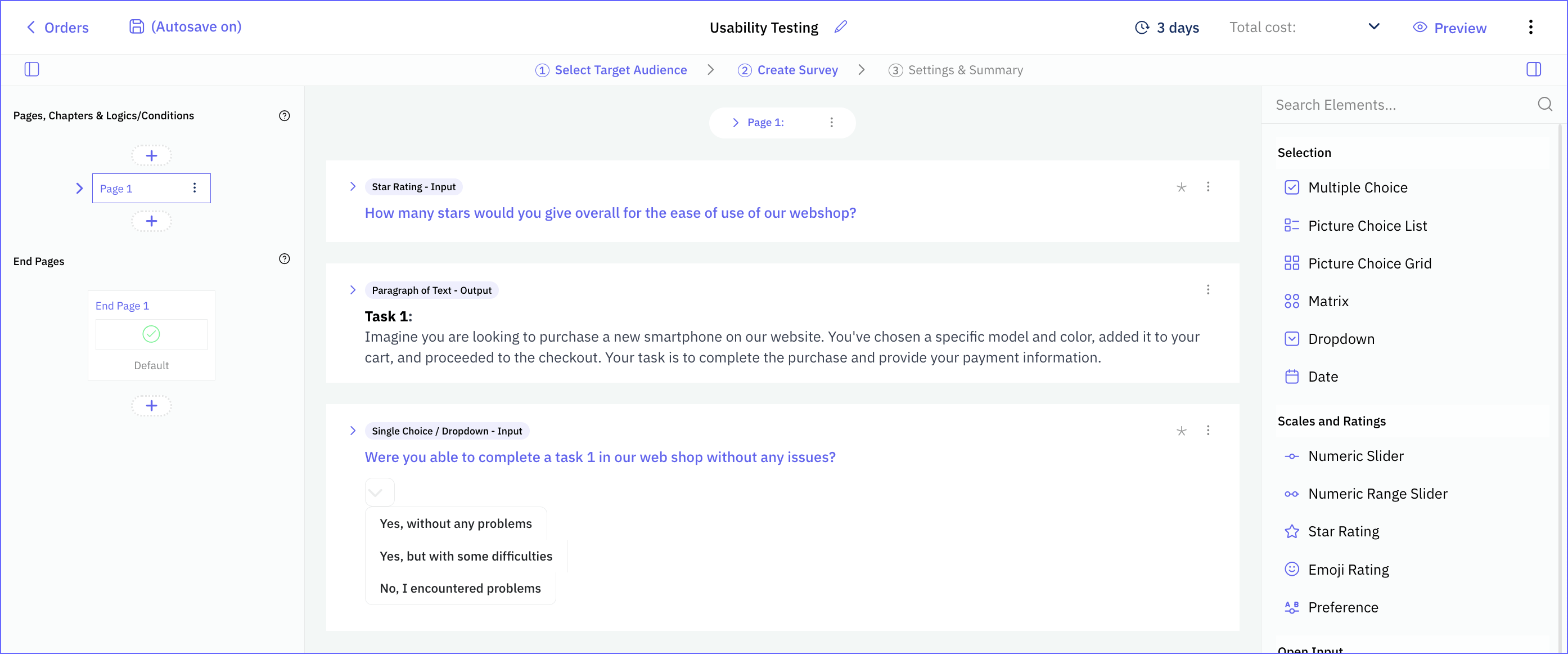
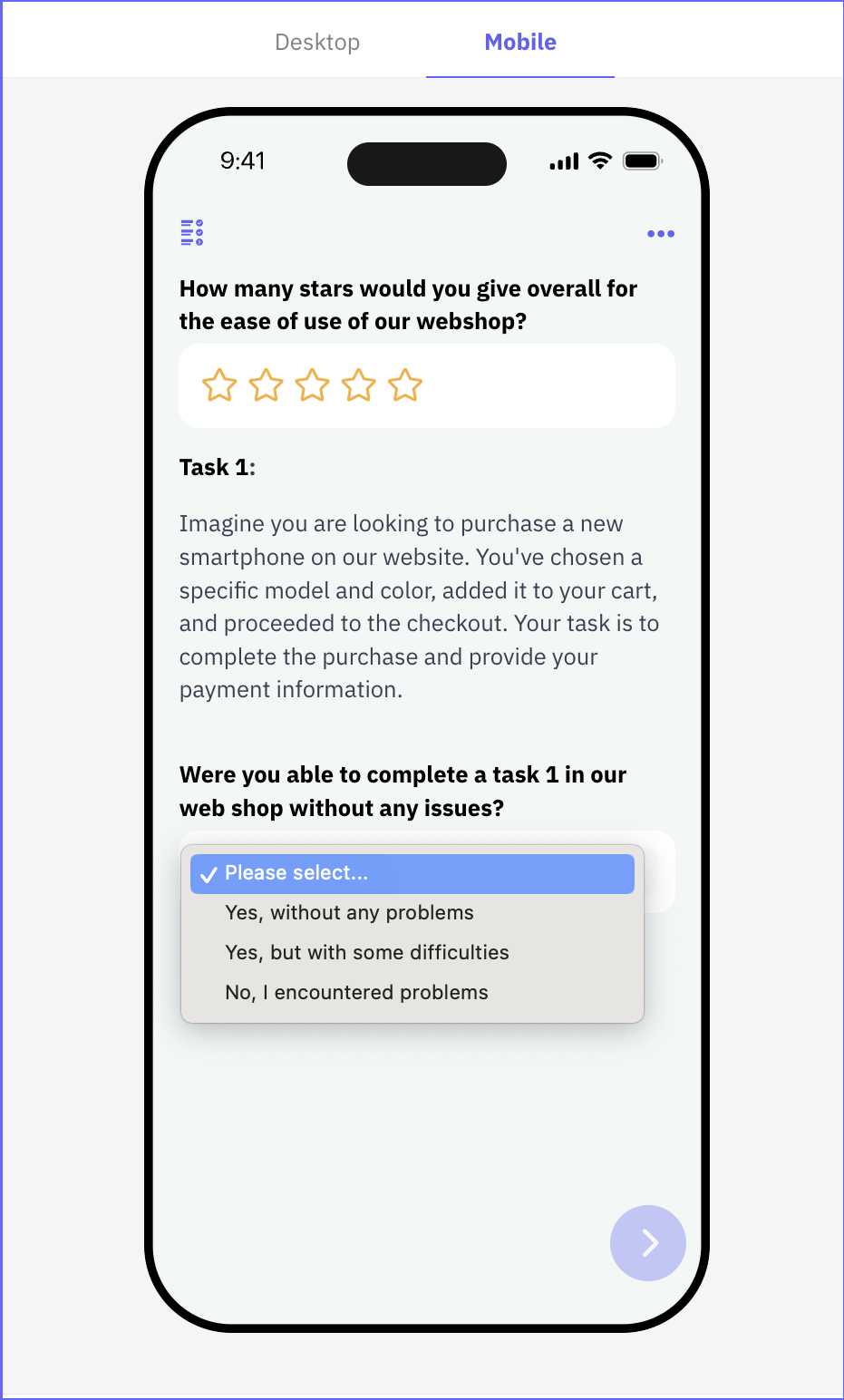
Remember, this guide provides a start to your usability testing process using clickworker's all in one survey tool. Adapt each step according to the specifics of the project and always review best practices from usability testing resources to refine your approach.
Usability Testing with clickworker
How well can users navigate your website? Ask your customers!
- Create your survey in just a few minutes with clickworker’s survey tool.
- Select participants with the right criteria from our pool.
- Track results in real time and visualize your insights.
Get started now!
Usability testing is essential for unlocking the full potential of digital products and ensuring a user-friendly, intuitive experience. It provides insights that go far beyond whether a product simply works and enables you to improve user experiences in a targeted way. By identifying weaknesses early and systematically and making user-centered adjustments, you not only increase user satisfaction but also make a significant contribution to business success. Tools like clickworker’s can simplify this process and increase efficiency when conducting and analyzing usability tests.


