


Understanding what users actually think, feel, and struggle with is the foundation of great product design. A well-crafted UX survey is one of the most reliable ways to gather that understanding at scale. Whether you are validating a new feature, diagnosing usability problems, or benchmarking satisfaction over time, a UX survey delivers structured, quantitative data that complements qualitative methods like interviews and usability tests.
The challenge is that poorly designed surveys produce misleading results: leading questions, ambiguous wording, or the wrong target audience can render even a large dataset meaningless. This guide walks through every stage of the process — from defining objectives and identifying your audience to crafting questions, avoiding common pitfalls, and analyzing results. Along the way you will find real-world question examples, a breakdown of B2B versus B2C survey design, and practical advice on how to turn raw responses into actionable UX improvements. By the end, you will have a clear framework for running UX surveys that generate reliable, decision-ready insights.
Table of Contents
- What Parts of Your UX Design Workflow Can Surveys Help With?
- Key Takeaways
- Defining Clear Objectives
- Identifying Target Audience
- B2B vs B2C Survey Design
- Establishing Success Metrics
- Crafting Engaging Questions
- Enriching Existing Data with Surveys
- Avoiding UX Survey Pitfalls
- How to Analyze Survey Data Effectively
- How to Use clickworker to Design, Run, and Gain Insights from Your UX Survey
- FAQ
UX teams often find UX surveys helpful at multiple stages of the design process, not just at the end. Used strategically, they provide quantitative grounding for decisions that might otherwise rest on assumption or anecdote.
The key is that UX surveys must be designed thoughtfully to yield reliable, actionable insights. Common mistakes to avoid include double-barreled questions, absolute language, and response options that do not cover the user’s actual experience. Piloting the survey and mixing closed and open-ended questions improves both quality and response data. Let’s explore how to define clear objectives to avoid these mistakes from the outset.
The table below summarizes the most important considerations when planning and running an effective UX survey.
| Aspect | Details |
|---|---|
| Importance of UX Surveys | UX surveys provide valuable insights into user preferences, behaviors, and experiences, informing design decisions and driving UX improvements. |
| Defining Clear Objectives | Establishing specific, measurable, and achievable goals ensures that survey questions yield actionable insights aligned with intended purposes. |
| Identifying Target Audience | Determining user segments based on demographics, behaviors, and preferences helps tailor survey questions and reach relevant user groups effectively. |
| B2B vs B2C Survey Design | B2B surveys target professional users with complex, detailed questions, while B2C surveys focus on general consumer usability and satisfaction with simpler questions. |
| Establishing Success Metrics | Key metrics like completion rates, task success rates, and NPS scores help measure survey performance and quantify the impact of UX changes. |
| Crafting Engaging Questions | Using a mix of open-ended and closed-ended questions, ensuring clarity, and pilot testing with a small group enhances survey engagement and data quality. |
Defining clear objectives is the pivotal first step in creating an effective UX survey. Well-defined goals streamline the survey structure, guide question development, and ensure results align with your intended purpose. Some key considerations for setting objectives include:
Clear objectives act as a roadmap, allowing you to craft focused questions that yield actionable insights to improve the user experience.
Build better products with our UX survey tool
Understanding your users’ needs and preferences allows you to build digital products that are effective, useful, and easy to use.
Start Your UX Research Today
Identifying your target audience is a crucial step in conducting an effective UX survey. This involves determining the specific user groups or segments you want to gather insights from, based on factors such as demographics, behaviors, preferences, and product usage patterns.
Some key considerations for identifying your target audience include:
By clearly identifying your target audience, you can tailor survey questions, distribution channels, and incentives to effectively reach and engage the relevant user groups, ensuring the collected data provides meaningful insights for improving their experiences.
When designing UX surveys for B2B (business-to-business) versus B2C (business-to-consumer) products, there are several key differences to consider.
For B2B surveys, the target audience is typically professionals using the product as part of their job. This requires tailoring questions to their specific roles, industry knowledge, and workflows. The surveys tend to be more complex, with a greater emphasis on product features, integrations, and efficiency. Larger sample sizes may also be needed due to smaller overall user bases.
In contrast, B2C surveys target a broader consumer audience with varying levels of product familiarity. Questions should be more straightforward, focusing on usability, visual appeal, and overall satisfaction. Shorter surveys with engaging visuals often work better for general consumers, and closed-ended rating scales can quickly capture consumer perceptions.
Overall, B2B UX surveys demand a more specialized approach attuned to the unique needs and environments of business users, while B2C surveys prioritize broad accessibility and an engaging experience for general consumers.
Establishing clear success metrics is essential for evaluating the effectiveness of your UX survey and the insights it provides. Well-defined metrics allow you to measure the survey’s performance, identify areas for improvement, and quantify the impact of user experience changes implemented based on the results.
Some key success metrics to consider include:
Establishing clear targets for these metrics upfront allows you to benchmark survey performance, iterate on the survey design, and demonstrate the tangible impact of user research on the overall product experience.
Crafting engaging questions is vital for a successful UX survey. Use a mix of open-ended questions to gather rich qualitative insights, and closed-ended or rating scale questions for quantitative data. Keep questions clear, unbiased, and focused on specific aspects of the user experience like usability, visual appeal, and functionality.
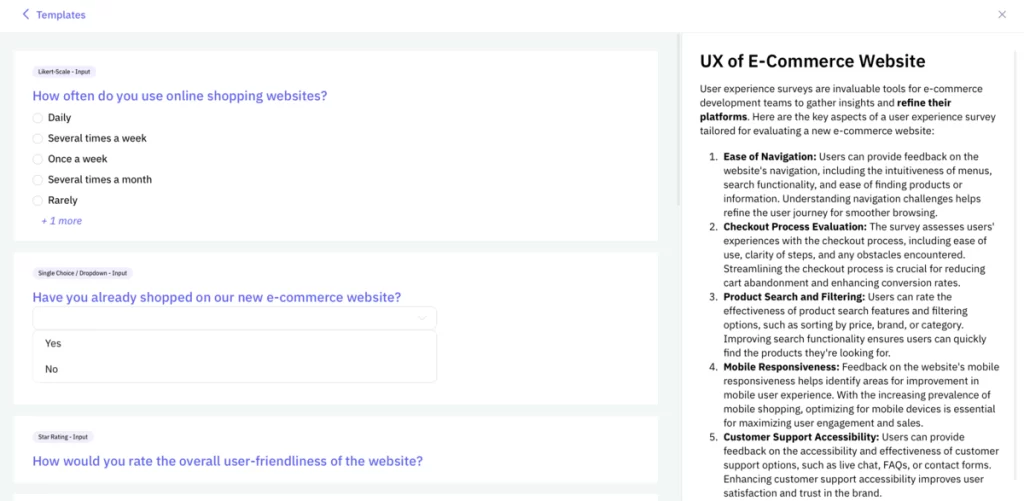
One of the UX survey templates available inside the clickworker survey tool.
Pilot test questions with a small group to identify ambiguities before distributing widely. Engaging questions captivate users’ interest and provide the actionable insights needed to improve your product’s user experience.
Here are some examples of UX survey questions that companies have used. They are grouped by purpose to make it easier to adapt them for your own research.
General Questions
Task-Based Questions
Feature / Functionality Questions
Visual Design Questions
Satisfaction / Loyalty Questions
Use these questions as inspiration when creating your own UX survey, or start from one of the built-in templates in the clickworker survey tool.
Leveraging existing customer data is a powerful way to inform and enhance your UX survey efforts. By combining data sources like website analytics, customer support logs, and past survey responses, you gain valuable context about user behaviors, pain points, and preferences before crafting new surveys. This allows you to build upon known issues, validate hypotheses, and tailor surveys to dig deeper into specific areas of the user experience.
For example, if web analytics show high abandonment rates for a particular checkout flow, you can design task-based surveys to observe users navigating that process and gather qualitative feedback on friction points. Or if support logs indicate recurring complaints about a feature, you can probe those issues with targeted rating questions and open-ended follow-ups in a survey.
Leveraging existing data enables you to craft more focused, relevant surveys that build upon quantitative trends with rich qualitative insights. This improves survey engagement, provides context for interpreting results, and ultimately leads to more impactful UX enhancements driven by a holistic understanding of your users.
Even well-intentioned UX surveys can produce unreliable data if common design and implementation mistakes are not addressed early. Here are the ten most frequent pitfalls and why they matter.
Unclear or unfocused objectives: Failing to define clear goals leads to unfocused questions that do not yield actionable insights.
Poorly crafted questions: Ambiguous, leading, or biased questions skew results and make it difficult to draw meaningful conclusions.
Neglecting to pilot test: Not testing the survey with a small sample first can leave issues with question clarity, flow, and overall user experience undetected.
Insufficient sample size: Too small a sample produces statistically insignificant results that do not accurately represent the larger user population.
Lack of demographic segmentation: Failing to segment respondents by relevant demographics can obscure important differences in user needs and preferences across groups.
Ignoring context and existing data: Not leveraging existing customer data results in missed opportunities to build on known issues or validate hypotheses.
Overly long or complex surveys: Lengthy surveys lead to survey fatigue, low completion rates, and poor-quality responses.
Improper distribution and incentives: Distributing surveys through ineffective channels or without proper incentives results in low response rates and skewed samples.
Neglecting to close the loop: Failing to communicate survey findings and subsequent actions to respondents erodes trust and discourages future participation.
Lack of continuous improvement: Not regularly reviewing and iterating on survey design leads to stagnation and missed optimization opportunities.
By avoiding these pitfalls, UX teams can design and implement surveys that generate high-quality, actionable insights to drive meaningful improvements to the user experience.
Once you have completed a UX survey, the quality of your analysis determines how much value you extract from the data. The following principles help ensure you turn raw responses into decisions.
Establish clear goals and metrics: Review the initial survey objectives and define specific metrics to evaluate success, such as completion rates, Net Promoter Scores (NPS), or task completion rates. This guides your analysis and ensures you extract insights aligned with your goals.
Clean and organize data: Before analysis, remove incomplete or invalid responses. Organize the data into a structured format suitable for analysis tools or statistical software.
Segment and filter responses: Segment responses based on relevant demographics, user characteristics, or behaviors to uncover patterns and differences across various user groups. Apply filters to focus on specific segments of interest.
Identify trends and correlations: Look for statistically significant trends, correlations, and relationships between different survey questions or response sets. These can reveal underlying user needs, pain points, or areas for improvement.
Triangulate with other data sources: Combine survey insights with website analytics, customer support logs, or usability testing results to gain a more comprehensive understanding of user experiences and validate findings.
Prioritize based on impact and effort: Prioritize insights and potential actions based on their potential impact on the user experience and the level of effort required to implement changes. Focus on high-impact, low-effort opportunities first.
Communicate findings clearly: Present survey insights in a clear, concise, and visually compelling manner to stakeholders. Use data visualizations, storytelling, and specific examples to effectively communicate the rationale behind recommendations.
Establish a continuous feedback loop: Incorporate survey findings into product roadmaps and development cycles, and plan follow-up surveys to measure the impact of changes and gather additional feedback on an ongoing basis.
By following these principles, UX teams can extract maximum value from survey data, uncover deep insights into user needs and experiences, and drive meaningful, data-driven improvements to their products and services.
clickworker is a powerful market research platform that streamlines the process of creating, running, and interpreting actionable insights from UX surveys. Here is how you can leverage clickworker for your UX survey needs.
Creating the survey: clickworker provides an intuitive survey builder that allows you to create custom surveys tailored to your UX research goals. You can choose from a variety of question types (multiple choice, rating scales, open-ended, etc.) and customize the look and feel of your survey.
Distributing the survey: Once your survey is ready, clickworker enables you to distribute it to your target audience through multiple channels, including email, website embed, social media, or clickworker’s own global participant panel of over 10 million workers. This ensures you reach the right users and collect relevant feedback.
Collecting responses: As responses come in, clickworker automatically collects and organizes the data in a centralized dashboard. You can monitor response rates and completion times in real-time.
Analyzing data: clickworker’s analysis tools allow you to dive deep into survey data and uncover actionable insights. You can filter and segment responses based on demographics or other criteria, identify statistically significant patterns and correlations across questions, visualize data through customizable charts and graphs, and automatically generate reports summarizing key findings.
Interpreting insights: With clickworker’s analysis capabilities, you can easily interpret survey data to gain a comprehensive understanding of user needs, pain points, and preferences. Key capabilities include triangulating survey data with other data sources like analytics or user testing, prioritizing insights based on potential impact and implementation effort, and collaborating with stakeholders through shared dashboards and reports.
By leveraging clickworker’s end-to-end survey capabilities, UX teams can efficiently create high-quality surveys, ensure broad distribution to precisely targeted audiences, analyze responses through advanced tools, and extract clear, actionable insights to drive user experience improvements.
Get detailed UX feedback on your product within hours.
Start with one of our built-in templates or create a fully custom UX survey with the easy-to-use drag-and-drop survey builder.
Learn More About Our UX Survey Tool
A UX survey is a structured questionnaire designed to collect quantitative and qualitative feedback from users about their experience with a product or service. It helps UX teams understand user needs, identify usability issues, and validate design decisions based on data rather than assumption.
Most effective UX surveys contain between 5 and 15 questions. Keeping the survey focused reduces survey fatigue and improves completion rates. If your topic is complex, consider splitting it into multiple shorter surveys rather than creating one long questionnaire.
A combination of closed-ended questions (rating scales, Likert scales, multiple choice) and open-ended questions delivers the best results. Closed-ended questions provide quantitative benchmarks such as NPS or CSAT scores, while open-ended questions surface the context and reasoning behind those scores.
You can recruit UX survey participants through your own user base (email lists, in-app prompts), social media, or a professional panel provider. clickworker offers access to over 10 million pre-screened global participants, allowing precise targeting by demographics, behavior, and product experience. Learn more at clickworker Survey Respondents.
A UX survey collects self-reported feedback from users at scale, making it ideal for measuring satisfaction, attitudes, and preferences. A usability test directly observes users completing tasks, revealing how they actually interact with a product. Both methods are complementary: surveys provide breadth, usability tests provide depth.
To minimize bias, avoid leading or double-barreled questions, provide balanced response scales, randomize answer options where possible, and pilot test the survey with a small group before full distribution. Neutral wording and clear, specific language are the most effective safeguards against respondent bias.


